
Presets & Themes
Stylesmith has twenty-four color themes you can use on their own, and twenty-four presets that combine a theme with its own file icon set and native VS Code settings.
Presets
A preset is a complete look: a color theme, a file icon theme and native VS Code settings that belong together, applied in one step and undone in one step.
How presets work
Apply
Choose a preset from the Stylesmith button in the status bar, or run Stylesmith: Apply Preset…. In one step it sets the color theme, the file icon theme and the settings listed on its card. To compare them first, run Stylesmith: Preset Gallery: it shows every preset with a code sample in its colors, its story and its settings, and an Apply button.
Undo
Run Stylesmith: Disable to put back your own color theme, icons and settings. If you changed one of them yourself after applying the preset, your change is kept.
What it leaves to you
A preset applies its recommended font if you already have it installed, and leaves Problem Lens as it is. If the font isn’t installed yet, click the Install button on its card in Stylesmith: Preset Gallery or choose it in the Stylesmith menu, which can install it for you after you confirm.
Compare presets
| Preset | Smooth cursor | Highlight current line | Bracket pair guides | Compact layout | Block editor cursor | Block terminal cursor | Dim unfocused editors | Readable terminal | Sticky scroll | Calm minimap | Recommended font |
|---|---|---|---|---|---|---|---|---|---|---|---|
| Phosphor Terminal | off | on | on | on | on | on | off | off | off | off | DepartureMono Nerd Font |
| Amber Monitor | off | on | on | on | on | on | off | off | off | off | BlexMono Nerd Font |
| Black ICE | on | on | on | off | off | off | off | off | off | off | ShureTechMono Nerd Font |
| Night City | on | on | on | off | off | on | off | off | off | off | JetBrainsMono Nerd Font |
| Monolith | on | on | on | off | off | off | on | off | on | on | GeistMono Nerd Font |
| Glass Lab | on | on | on | off | off | off | on | off | on | on | GeistMono Nerd Font |
| Vault | on | on | on | off | off | on | off | off | off | off | SpaceMono Nerd Font |
| Simulation | on | on | on | off | off | on | off | off | off | off | JetBrainsMono Nerd Font |
| Steel and Rust | on | on | on | off | off | off | on | off | off | on | ShureTechMono Nerd Font |
| Deep Desert | on | on | on | off | off | off | off | off | off | on | SpaceMono Nerd Font |
| Haze | on | on | on | off | off | off | on | off | off | on | GeistMono Nerd Font |
| Grid | on | on | on | on | off | off | off | off | on | off | MartianMono Nerd Font |
| Corridor | off | on | off | on | off | on | off | off | off | off | 3270 Nerd Font |
| Teal Terminal | off | on | off | on | on | on | off | off | on | off | 3270 Nerd Font |
| Horizon | on | on | on | off | off | off | off | off | off | off | RecMonoCasual Nerd Font |
| Command Deck | on | on | on | off | off | on | off | off | on | off | 3270 Nerd Font |
| Brass | on | on | on | off | off | off | off | off | off | on | MonaspiceXe Nerd Font |
| Tea Garden | on | on | off | off | off | off | off | off | off | on | RecMonoCasual Nerd Font |
| Sunroom | on | on | off | off | off | off | on | off | off | on | RecMonoCasual Nerd Font |
| Countdown | on | on | on | off | off | off | on | off | off | on | BlexMono Nerd Font |
| Overlay | on | on | on | off | off | on | off | off | on | off | MartianMono Nerd Font |
| Daylight | on | on | off | off | off | off | off | off | off | off | JetBrainsMono Nerd Font |
| High Contrast | off | on | on | off | off | off | off | on | off | off | AtkynsonMono Nerd Font |
| High Contrast Light | off | on | on | off | off | off | off | on | off | off | AtkynsonMono Nerd Font |
Retro terminals
Monitors and terminals of the 1970s and 80s, each true to the color of its phosphor.
-
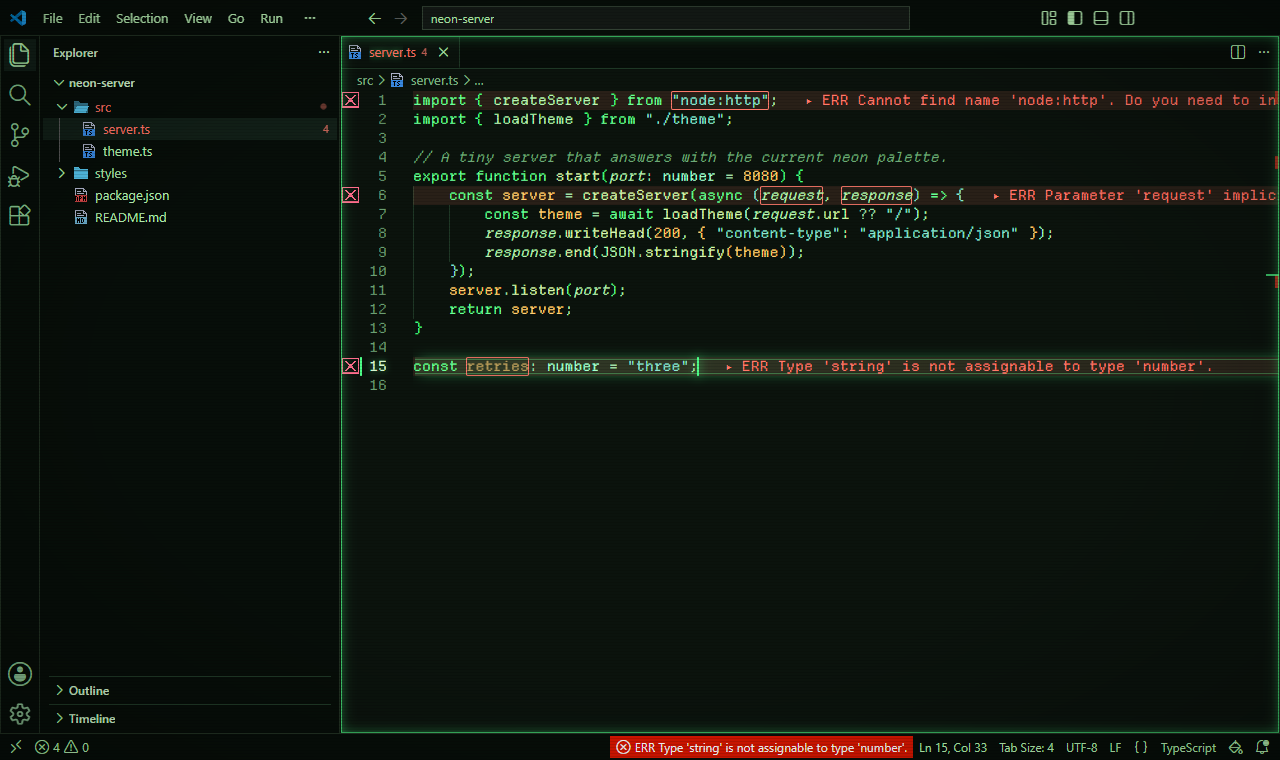
Phosphor Terminal
A late-1970s green-phosphor video terminal: green on near-black, pixel icons in the same greens, a dense, compact layout, and block cursors that blink without animation.
The story
Where it comes from. IBM's 5151 monochrome display (1981) drew its text in green P39 phosphor that kept glowing after the beam had moved on. It cut flicker, and left a faint trace whenever text scrolled.
The colors. Everything stays within that green. Keywords are the brightest strokes, strings and functions sit in softer greens, and comments are dimmed like a fading trace on the glass. There are no italics or bold: on the terminal, emphasis came from brightness alone.
The settings. Block cursors in the editor and the terminal blink on and off without animation, and the compact layout packs the screen the way terminals of the time did.
- Color theme
- Stylesmith Phosphor
- File icons
- Stylesmith Pixel Phosphor
- Settings on
- Highlight current line, Bracket pair guides, Compact layout, Block editor cursor, Block terminal cursor
- Recommended font
- DepartureMono Nerd Font
-
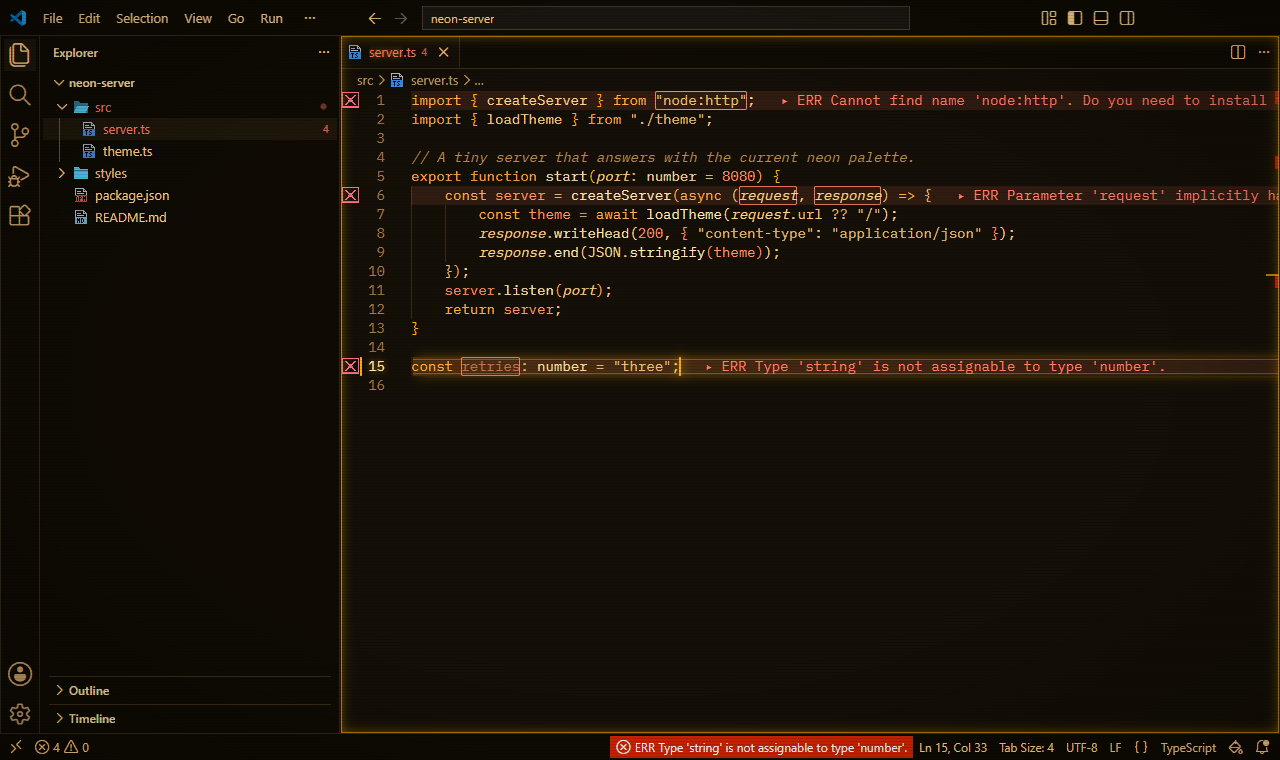
Amber Monitor
An early-1980s amber monochrome monitor: warm amber tones, matching pixel icons, a compact layout, and block cursors that blink without animation.
The story
Where it comes from. By the early 1980s, a monitor could glow amber as well as green or white: DEC's VR201, for one, was sold with white, green or amber (P134) phosphor.
The colors. Warm amber and orange on a dark brown-black. Keywords burn brightest, numbers lean toward orange, and comments fade toward brown. One weight and no italics, as on the monitor itself.
The settings. The same mechanical feel as Phosphor Terminal: block cursors that blink without animation, and a compact layout.
- Color theme
- Stylesmith Amber
- File icons
- Stylesmith Pixel Amber
- Settings on
- Highlight current line, Bracket pair guides, Compact layout, Block editor cursor, Block terminal cursor
- Recommended font
- BlexMono Nerd Font
-
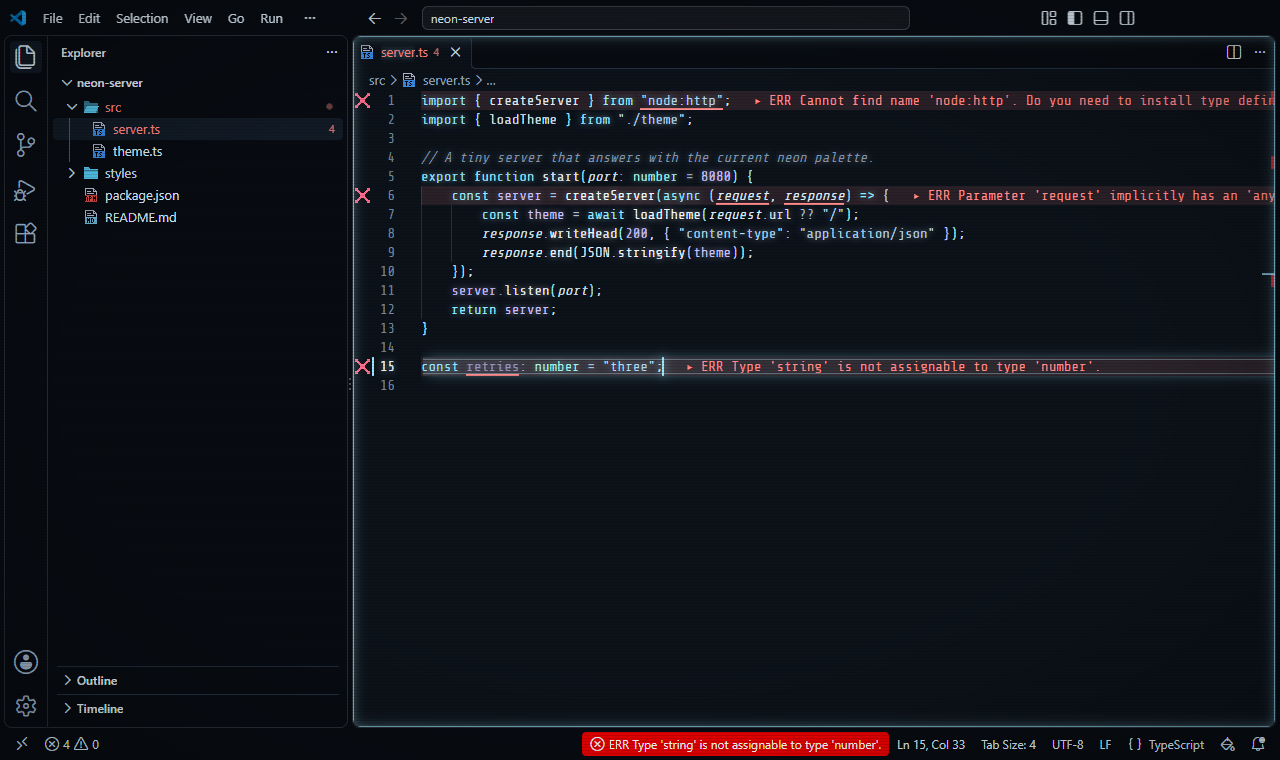
Black ICE
A cold white-phosphor screen with ice-blue accents and matching pixel icons, and only the calmer editor settings.
The story
Where it comes from. DEC's VT100 terminal (1978) glowed in white P4 phosphor. A few years later, William Gibson's stories, from Burning Chrome to Neuromancer, gave cyberspace its ICE: intrusion countermeasures electronics, the cold walls around guarded data, a term Gibson credited to Tom Maddox.
The colors. Cold white phosphor on a blue-black screen: blue-white text and syntax and ice-blue keywords. Only errors and deleted lines break the ice, in warm colors. No italics or bold, like the character terminals of its time.
The settings. Only the calm settings: smooth cursor, current-line highlight and bracket guides. Nothing moves that doesn't have to.
- Color theme
- Stylesmith ICE
- File icons
- Stylesmith Pixel ICE
- Settings on
- Smooth cursor, Highlight current line, Bracket pair guides
- Recommended font
- ShureTechMono Nerd Font
Inspired by film
Moods from screen worlds, described in our own words.
-
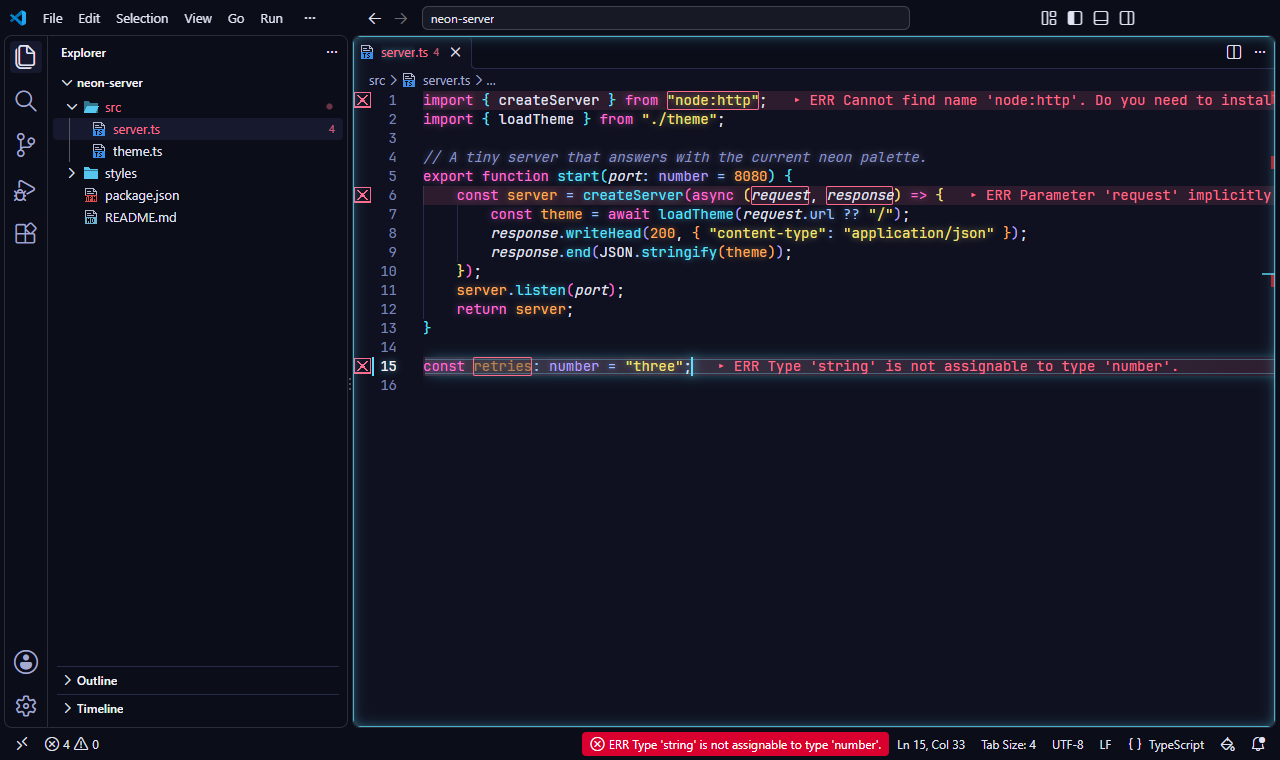
Night City
Neon pinks and cyans on deep indigo, the look of a city at night, with pixel file icons and a block cursor in the terminal.
The story
Where it comes from. In William Gibson's Neuromancer (1984), Night City is the outlaw district beside Chiba, where the neon never goes off. The same rain-wet, sign-lit streets run through the cyberpunk films of the 1980s.
The colors. Hot pink and cyan accents glow against a deep indigo night, with yellow strings like light from a passing sign. Comments sink back into the blue, like shopfronts out of focus.
The settings. The smooth cursor and current-line highlight keep the city calm while you work; a block cursor in the terminal is the one nod to the machines of the era.
- Color theme
- Stylesmith Neon Night
- File icons
- Stylesmith Pixel Neon Night
- Settings on
- Smooth cursor, Highlight current line, Bracket pair guides, Block terminal cursor
- Recommended font
- JetBrainsMono Nerd Font
-
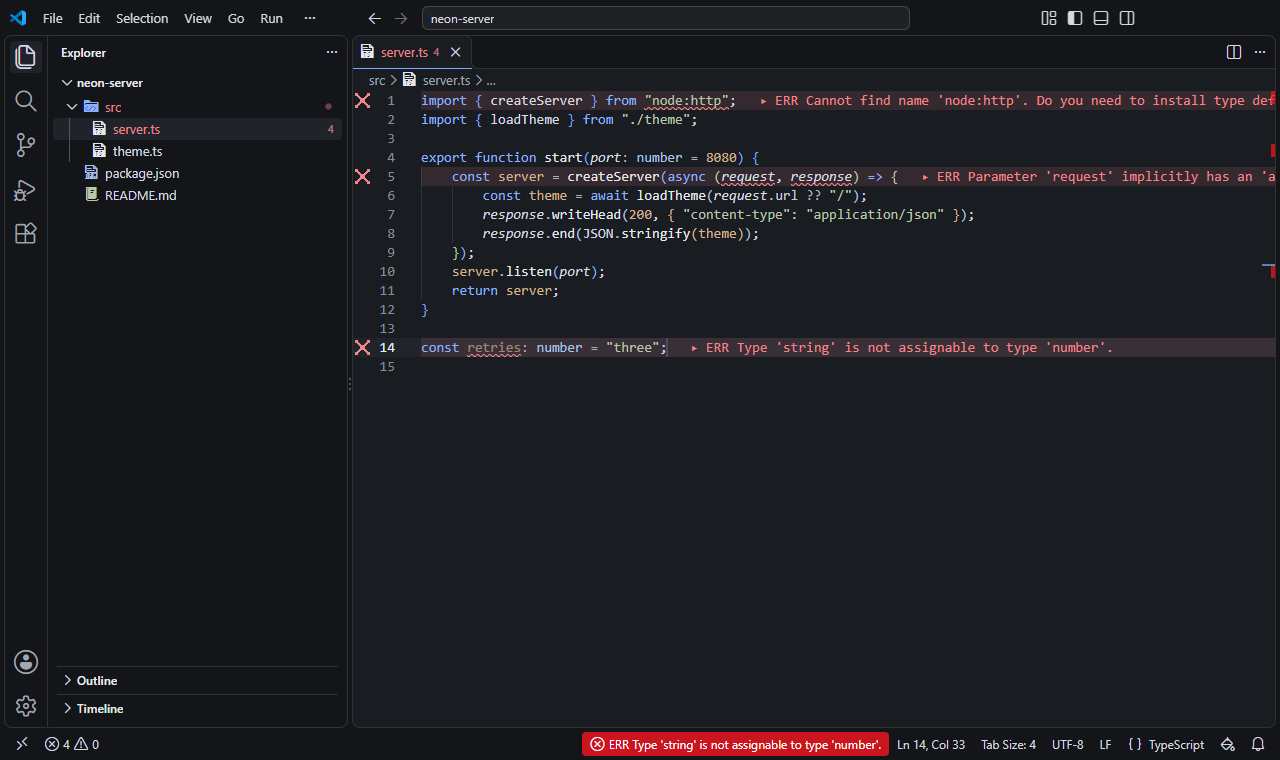
Monolith
Blue-grey stone with one soft blue accent, and only the quiet editor settings. Editors you aren't working in are dimmed, so the one in use stands out.
The story
Where it comes from. Ted Chiang's novella Story of Your Life (1998), and the film made from it, imagine a linguist learning a language written in rings of ink, in grey rooms full of fog and patience.
The colors. Blue-grey stone and one soft blue accent, shared by the keywords. Syntax stays in quiet greys, sage and tan, so the single accent carries the structure.
The settings. Only the quiet settings, and the editors you aren't working in are dimmed, as if in fog, so the one in use stands out.
- Color theme
- Stylesmith Monolith
- File icons
- Stylesmith Pixel Monolith
- Settings on
- Smooth cursor, Highlight current line, Bracket pair guides, Dim unfocused editors, Sticky scroll, Calm minimap
- Recommended font
- GeistMono Nerd Font
-
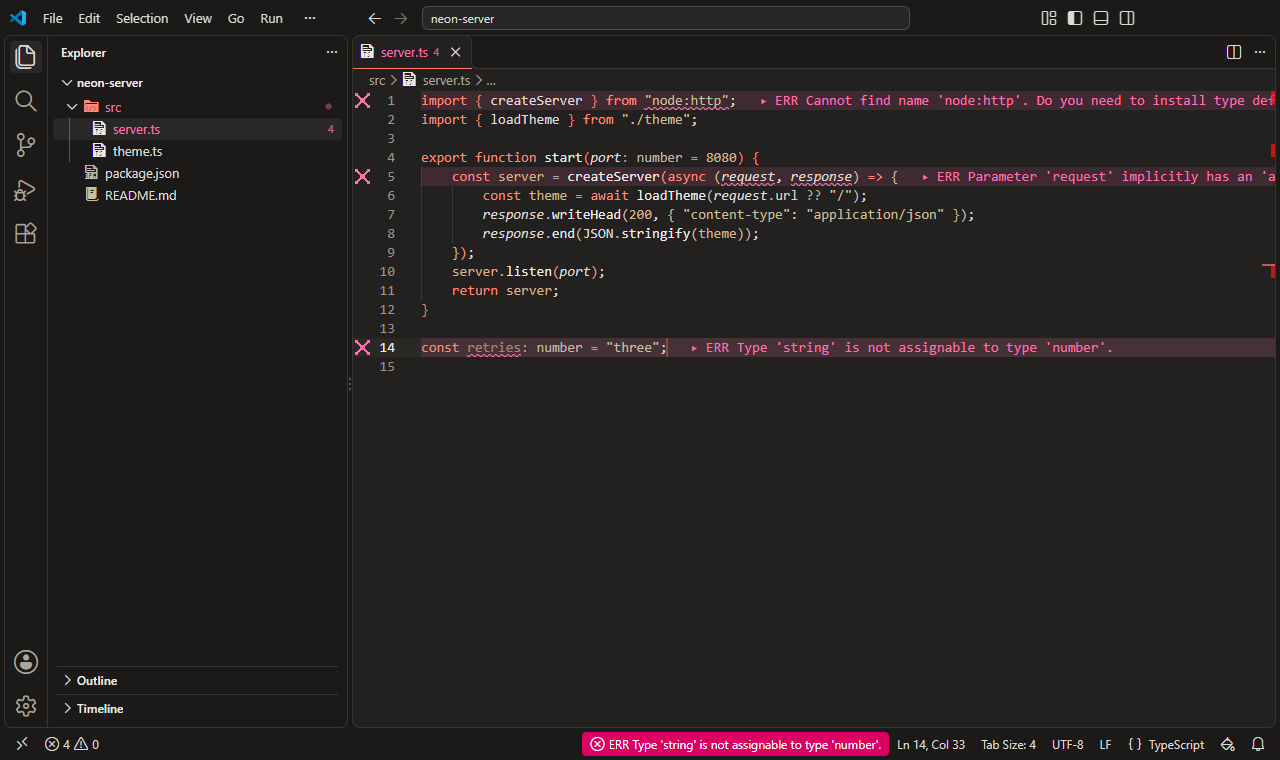
Glass Lab
Warm concrete greys, soft off-white text and one coral accent, with the quiet editor settings and dimmed unfocused editors.
The story
Where it comes from. Science-fiction cinema of the 2010s imagined a research lab of glass and concrete hidden in a forest: quiet, precise, minimal and a little unsettling, where a single color marks everything that matters.
The colors. Warm concrete greys, soft off-white text and one coral accent. Errors lean magenta and deleted lines orange, so neither is mistaken for the accent.
The settings. Only the quiet settings, with unfocused editors dimmed, as in Monolith: the lab stays still while you think.
- Color theme
- Stylesmith Glass Lab
- File icons
- Stylesmith Pixel Glass Lab
- Settings on
- Smooth cursor, Highlight current line, Bracket pair guides, Dim unfocused editors, Sticky scroll, Calm minimap
- Recommended font
- GeistMono Nerd Font
-
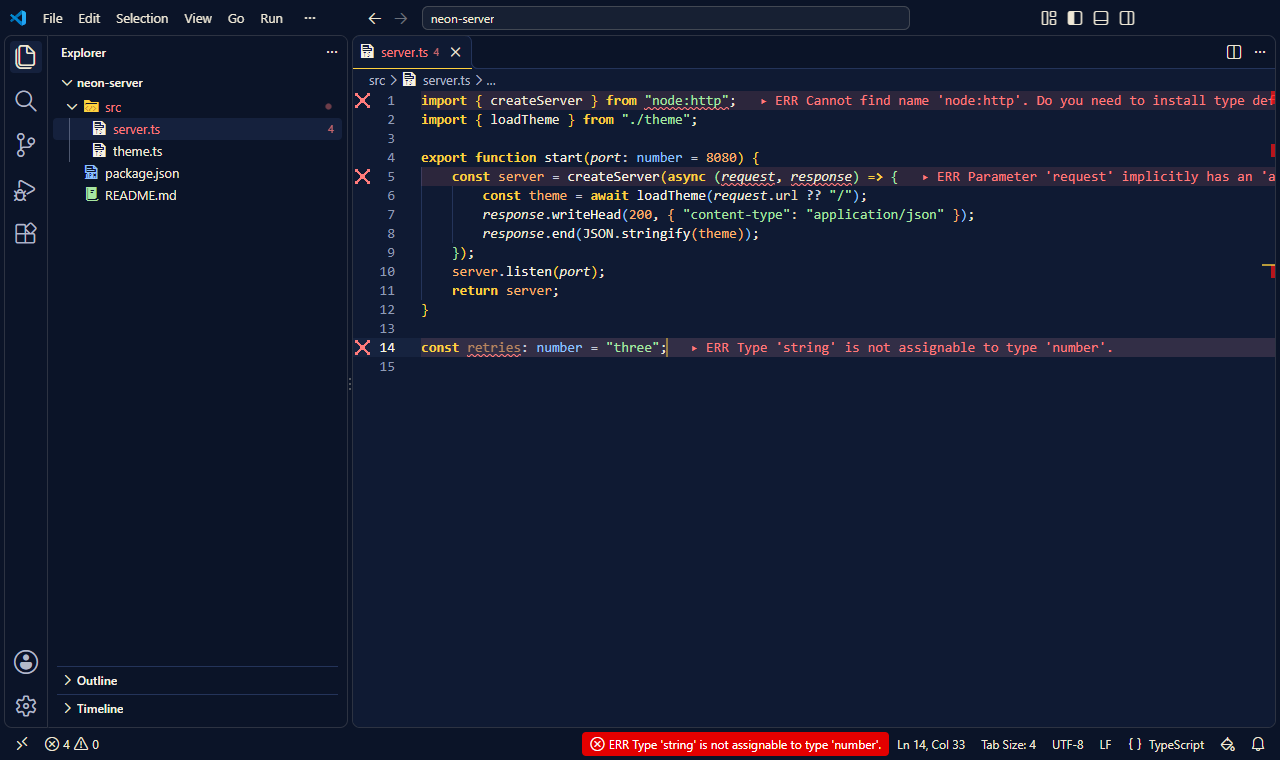
Vault
Deep navy and bright vault yellow, an optimistic 1950s vision of the future, with a block cursor in the terminal.
The story
Where it comes from. The 1950s pictured the atomic future with confidence: clean institutional design, bright primaries and a cheerful voice on the loudspeaker, even deep underground. Decades later, games turned that optimism into a whole aesthetic.
The colors. A deep navy shelter, warm off-white text and a bright vault yellow for keywords. Blue and yellow stay far apart with every kind of color blindness.
The settings. The calm settings, and a block cursor in the terminal, like the consoles of a shelter built to last.
- Color theme
- Stylesmith Vault
- File icons
- Stylesmith Pixel Vault
- Settings on
- Smooth cursor, Highlight current line, Bracket pair guides, Block terminal cursor
- Recommended font
- SpaceMono Nerd Font
-
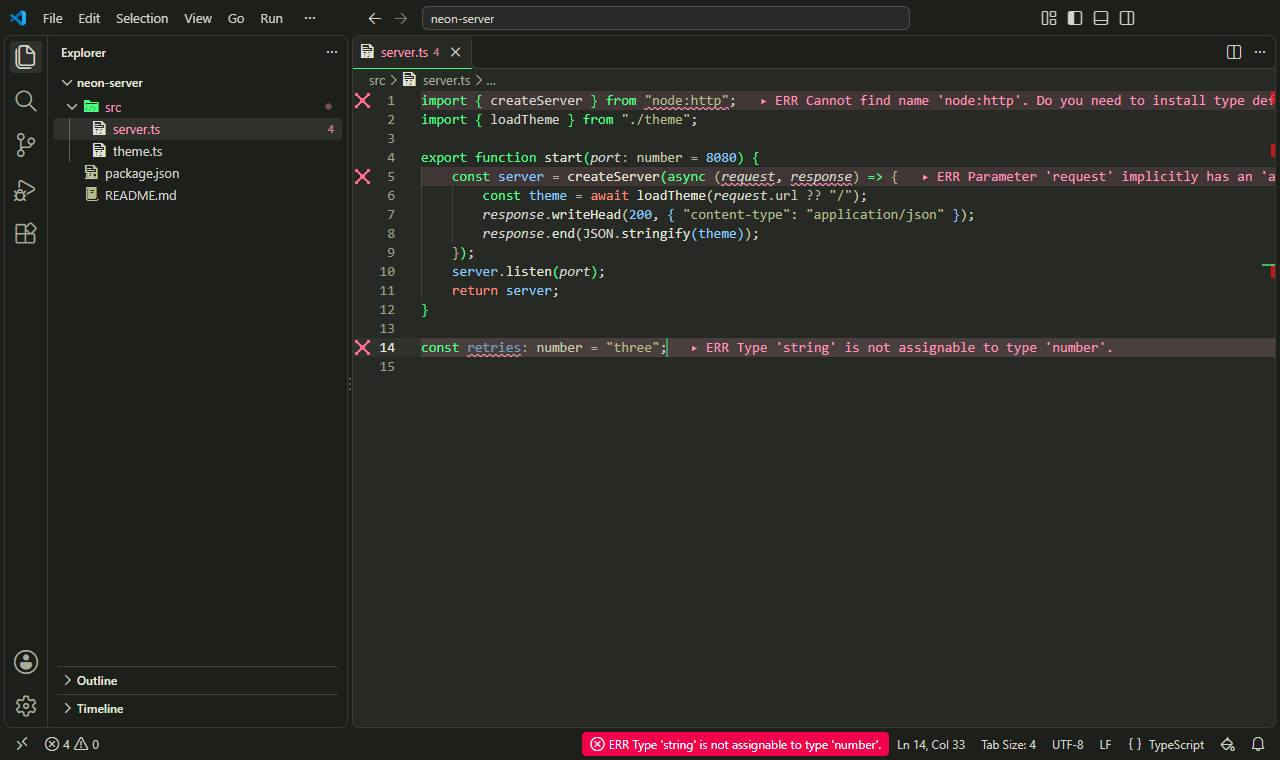
Simulation
A greyed, green-cast city where only the code glows: a late-1990s film world, with a block cursor in the terminal.
The story
Where it comes from. Cyberpunk cinema of the late 1990s graded its simulated world green: grey office towers, rain and black coats under a sickly cast, while the code itself fell bright down black screens.
The colors. A charcoal background with a faint green cast, and greyed text and syntax, like the color grade. Only keywords glow in code green. A warm red marks return, break and throw, the moments that change what happens, and blue marks constants.
The settings. The calm settings, and a block cursor in the terminal, where the code lives.
- Color theme
- Stylesmith Simulation
- File icons
- Stylesmith Pixel Simulation
- Settings on
- Smooth cursor, Highlight current line, Bracket pair guides, Block terminal cursor
- Recommended font
- JetBrainsMono Nerd Font
-
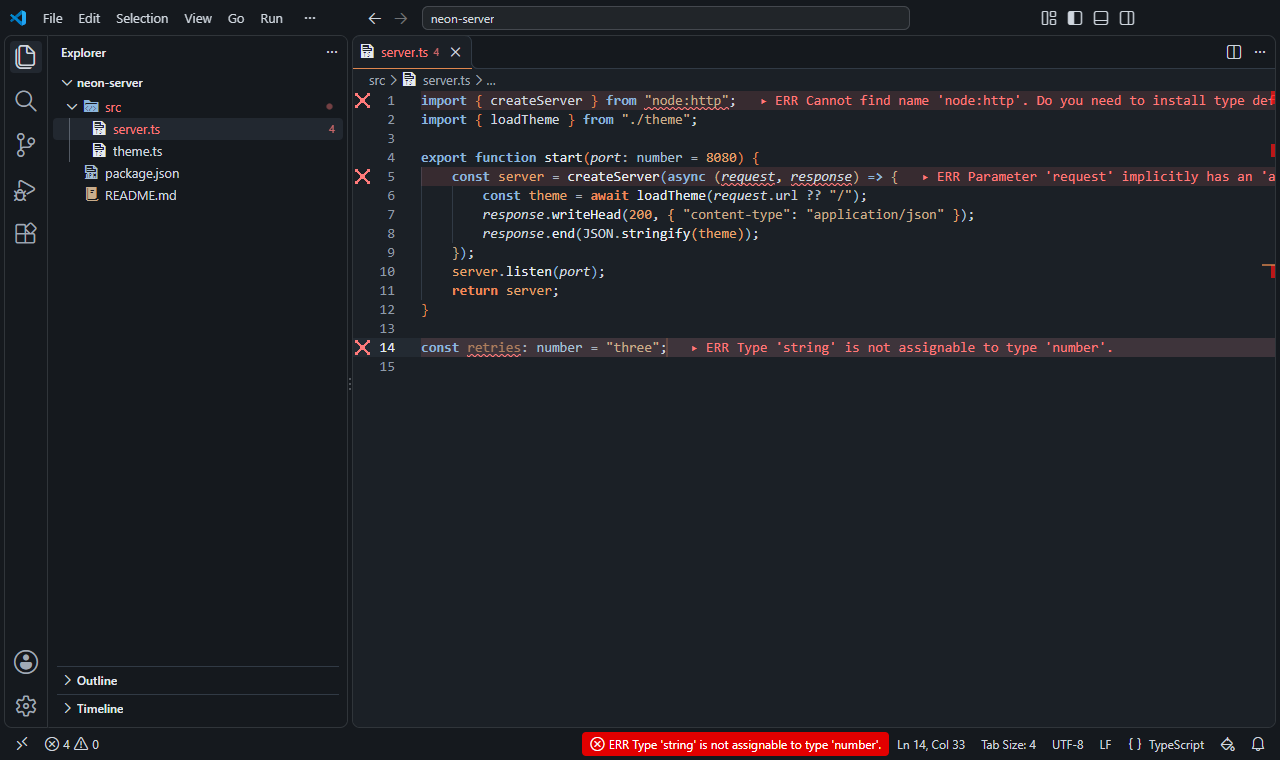
Steel and Rust
Cold blue-grey steel and dim light, with rust for what matters: the real world outside the simulation, with dimmed unfocused editors.
The story
Where it comes from. The same films showed the world outside the simulation as cold, dim and worn: steel corridors, blue-grey light and rust, where people lived after waking up.
The colors. Cold blue-grey steel and dim light. Keywords are steel blue, strings a muted brass, and rust marks numbers and the keywords that change control flow.
The settings. Only the quiet settings, with unfocused editors dimmed, like the low light of a ship's corridor.
- Color theme
- Stylesmith Steel and Rust
- File icons
- Stylesmith Pixel Steel and Rust
- Settings on
- Smooth cursor, Highlight current line, Bracket pair guides, Dim unfocused editors, Calm minimap
- Recommended font
- ShureTechMono Nerd Font
-
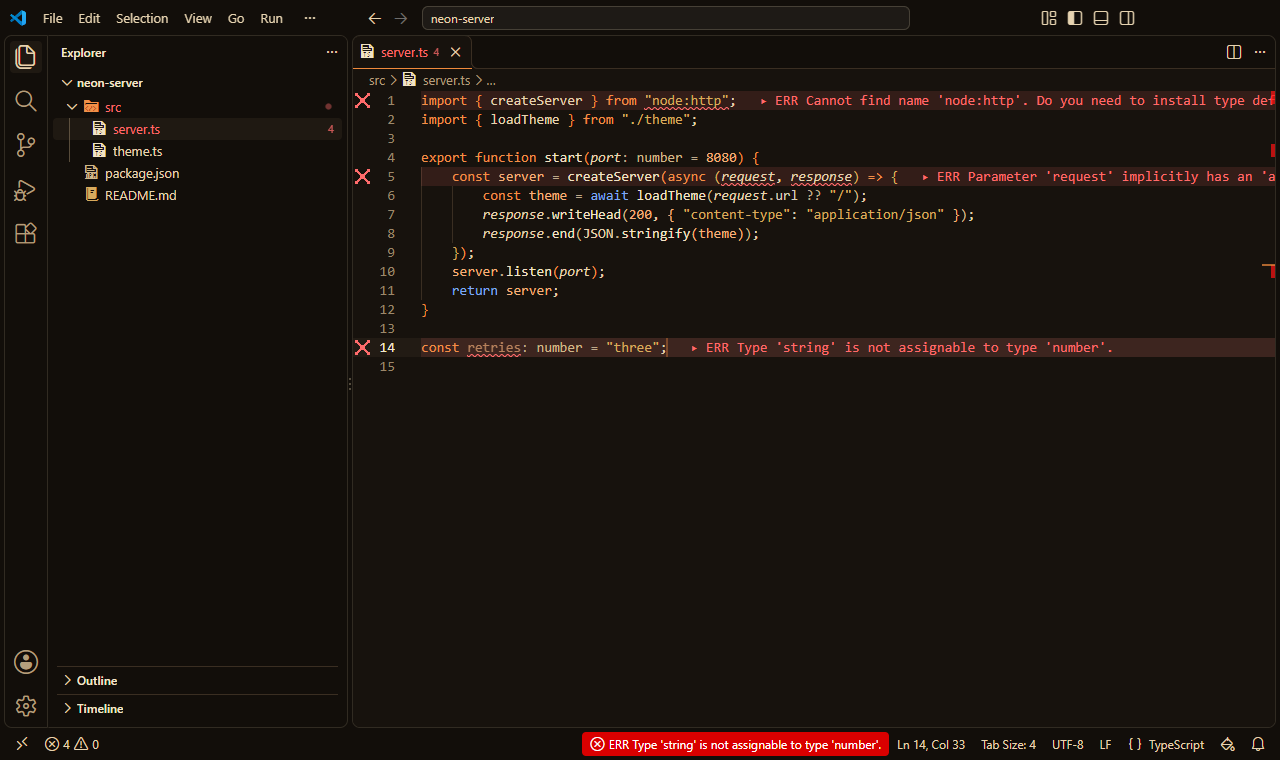
Deep Desert
Sand and ochre under a harsh sun, on the black of rock interiors, with one deep blue for the moments that change the flow.
The story
Where it comes from. Recent films about a desert planet showed endless dunes in ochre and sand, black suits against the heat, carved rock interiors, and a sun that bleaches everything.
The colors. Near-black brown, like the shade of a rock hall, with sand-colored text. Keywords glow spice orange and strings are ochre. A single deep blue marks return, break and throw, used as sparingly as water.
The settings. Only the calm settings: smooth cursor, current-line highlight and bracket guides.
- Color theme
- Stylesmith Deep Desert
- File icons
- Stylesmith Pixel Deep Desert
- Settings on
- Smooth cursor, Highlight current line, Bracket pair guides, Calm minimap
- Recommended font
- SpaceMono Nerd Font
-
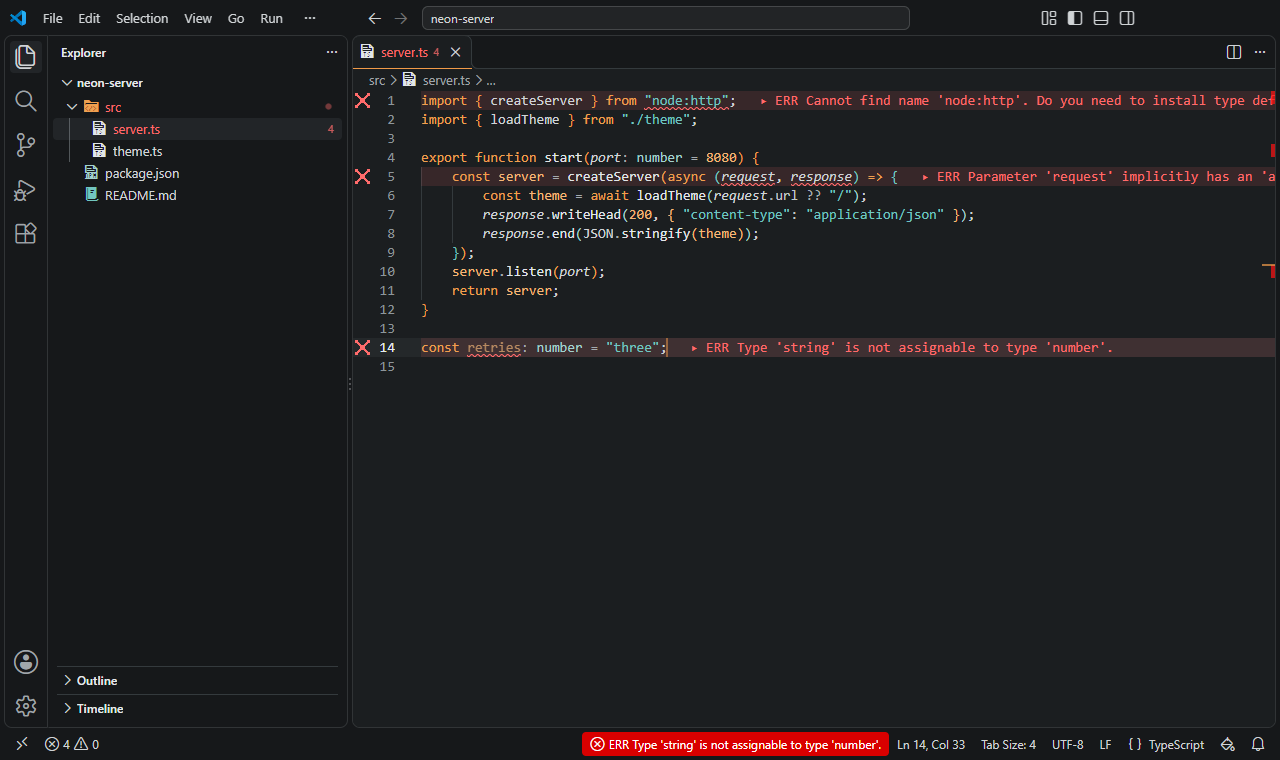
Haze
Orange dust over cold concrete, with teal rain: a muted, modern noir, with unfocused editors dimmed.
The story
Where it comes from. A late-2010s sequel to a classic of cyberpunk cinema replaced the neon of the 1980s with orange dust hanging over a dead city, cold brutalist concrete and teal rain.
The colors. Cold grey concrete, with two colors breaking through: the orange of the haze for keywords, and the teal of the rain for strings. The rest stays muted, like a city seen through dust.
The settings. The calm settings, with unfocused editors dimmed, like everything beyond the haze.
- Color theme
- Stylesmith Haze
- File icons
- Stylesmith Pixel Haze
- Settings on
- Smooth cursor, Highlight current line, Bracket pair guides, Dim unfocused editors, Calm minimap
- Recommended font
- GeistMono Nerd Font
-
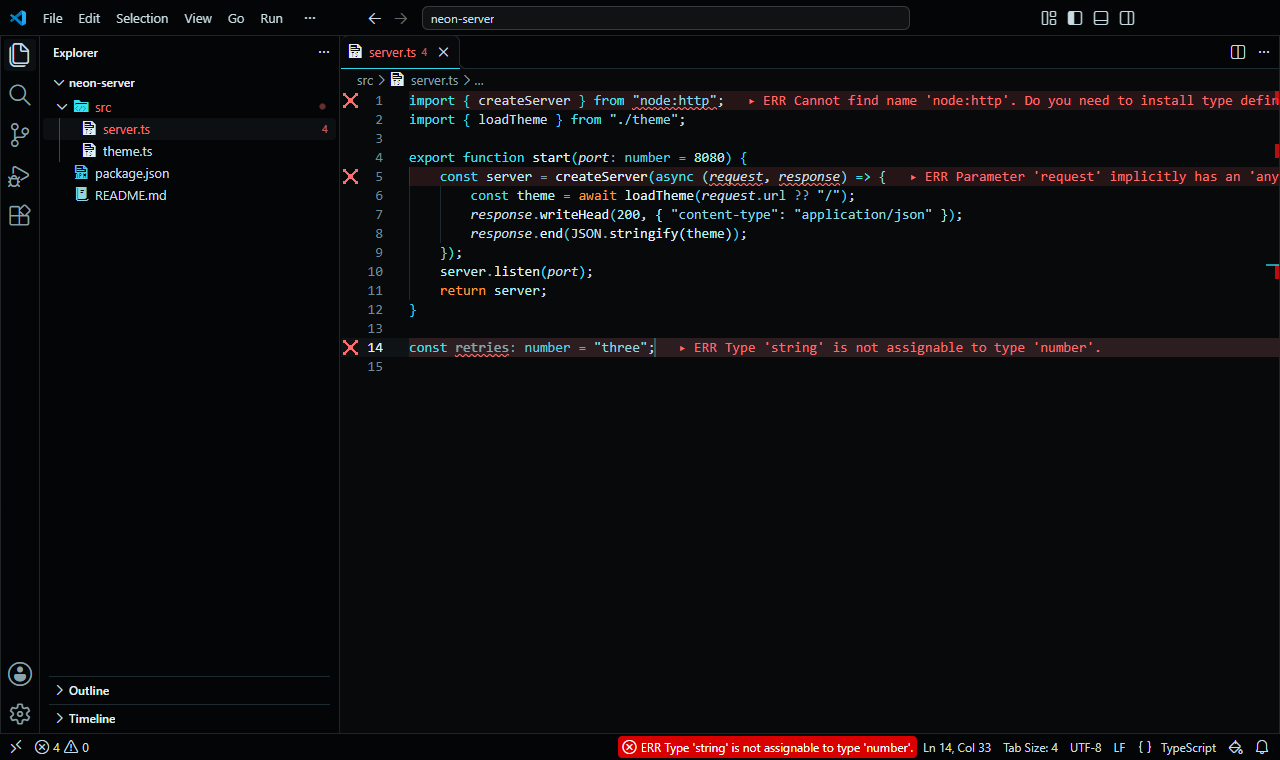
Grid
Light lines on black: cyan for the code you trust, and orange for the adversary, only where the flow changes, in a compact layout.
The story
Where it comes from. A 2010 film set inside a computer drew its world as pure black crossed by glowing lines: cyan for the programs, orange for their adversary.
The colors. Near-black, with cyan keywords and pale cyan text and strings. Orange appears only for return, break and throw, the adversary's color. The extension API can't draw a glow, so the lines stay clean.
The settings. Smooth cursor, current-line highlight and bracket guides: the guides draw the grid, and a compact layout lets it fill the screen.
- Color theme
- Stylesmith Grid
- File icons
- Stylesmith Pixel Grid
- Settings on
- Smooth cursor, Highlight current line, Bracket pair guides, Compact layout, Sticky scroll
- Recommended font
- MartianMono Nerd Font
-
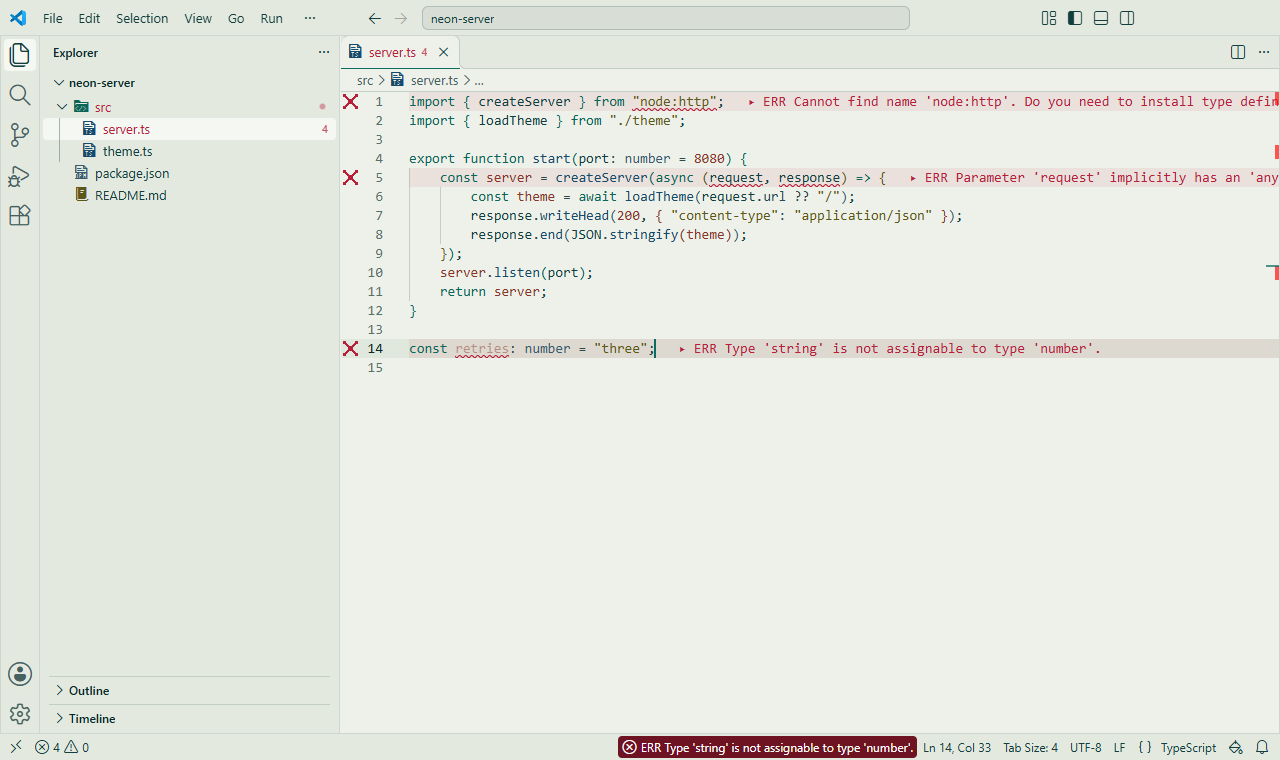
Corridor
A sterile office floor: pale institutional green, dark teal text, a compact layout and a block cursor in the terminal.
The story
Where it comes from. A 2020s thriller series set its story on a sterile mid-century office floor: long white corridors, boxy teal-green terminals, and numbers on screen that somehow feel frightening.
The colors. Pale institutional green with dark teal text, teal keywords and a blue for functions. Numbers are rust, and quietly unsettling. No italics or bold, like the terminals on the desks. Teal Terminal is the dark theme of the same floor.
The settings. A compact layout, the current-line highlight and a block cursor in the terminal: efficient, orderly, and slightly eerie.
- Color theme
- Stylesmith Corridor
- File icons
- Stylesmith Pixel Corridor
- Settings on
- Highlight current line, Compact layout, Block terminal cursor
- Recommended font
- 3270 Nerd Font
-
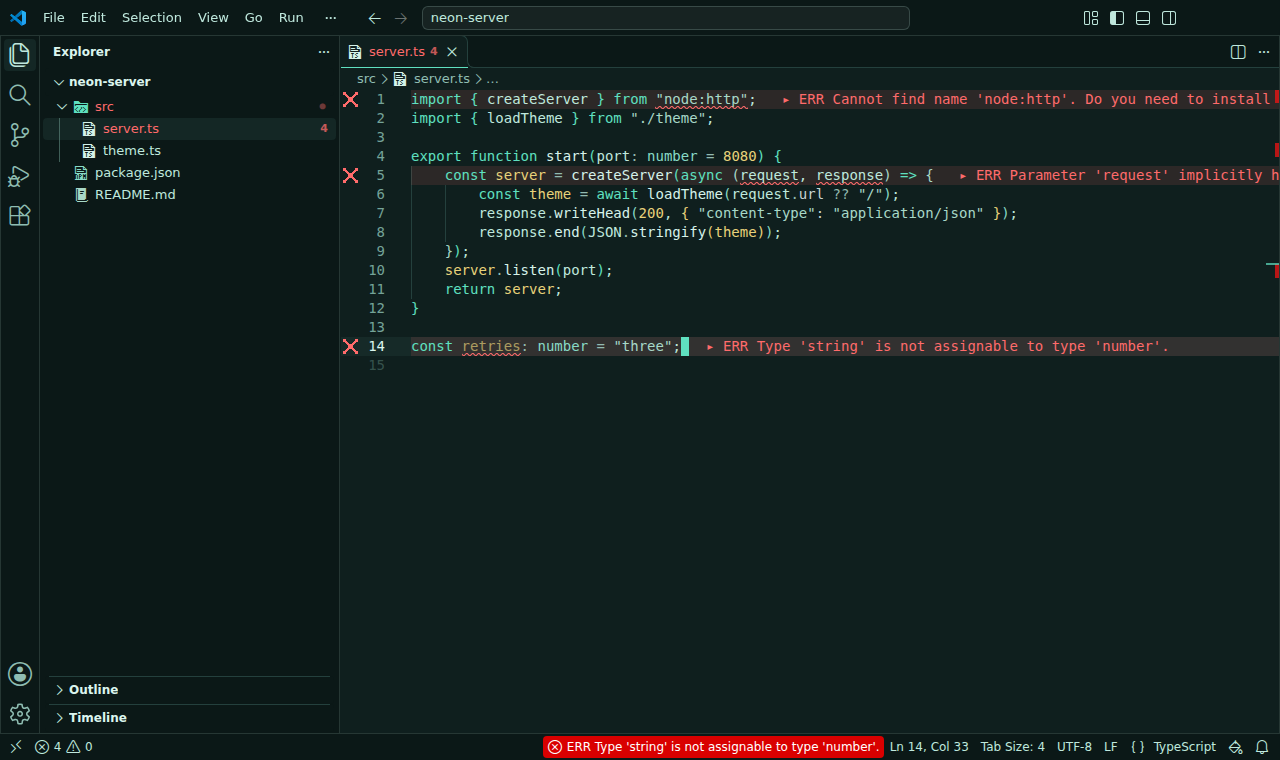
Teal Terminal
The office floor's boxy teal-green terminals: mint keywords and pale yellow numbers on dark teal, in a compact layout with block cursors that blink without animation.
The story
Where it comes from. On the same mid-century office floor as Corridor, each desk holds a boxy terminal with a dark teal-green screen, where rows of numbers wait to be sorted into bins.
The colors. Dark teal-green with pale mint text, mint keywords and pale yellow numbers. One weight and no italics, like a character terminal built for one job.
The settings. A compact layout, sticky scroll, and block cursors in the editor and terminal that blink without animation.
- Color theme
- Stylesmith Teal Terminal
- File icons
- Stylesmith Pixel Teal Terminal
- Settings on
- Highlight current line, Compact layout, Block editor cursor, Block terminal cursor, Sticky scroll
- Recommended font
- 3270 Nerd Font
-
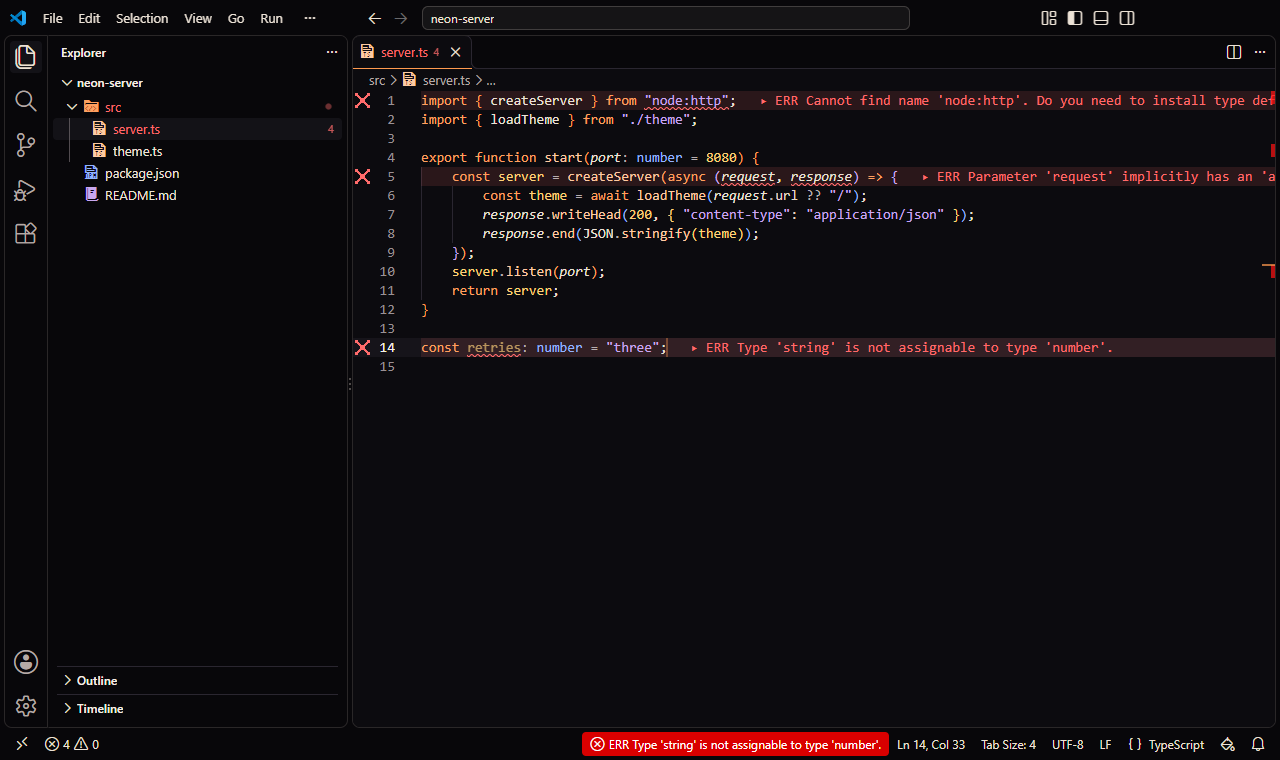
Horizon
Warm orange, peach and lilac on black, with blue for structure: calm, friendly and optimistic.
The story
Where it comes from. Television's starship sagas of the 1980s and 90s imagined computer screens as calm, rounded panels in warm orange, peach and lilac on black: the future as a friendly place.
The colors. Black, with keywords in warm orange, functions in peach, strings in lilac and types in blue. Only the colors are borrowed, never the shapes of the panels.
The settings. Only the calm settings: smooth cursor, current-line highlight and bracket guides.
- Color theme
- Stylesmith Horizon
- File icons
- Stylesmith Pixel Horizon
- Settings on
- Smooth cursor, Highlight current line, Bracket pair guides
- Recommended font
- RecMonoCasual Nerd Font
-
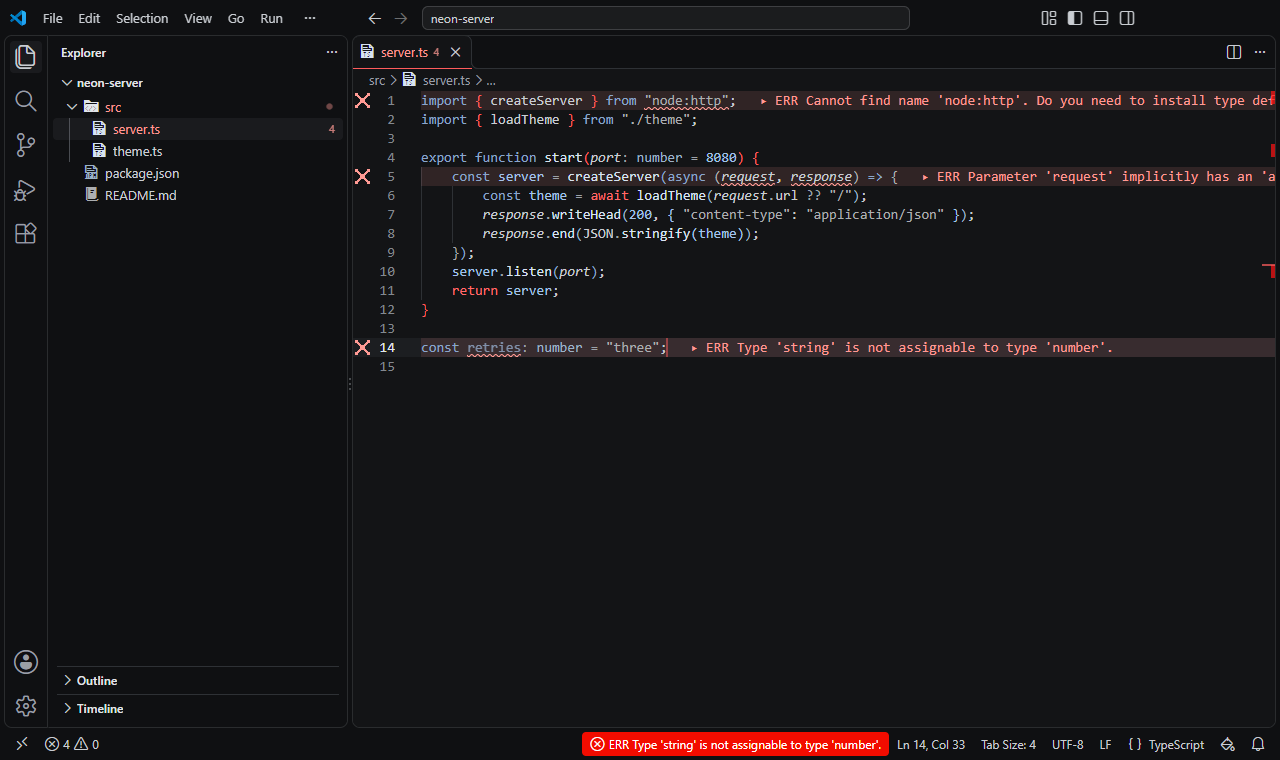
Command Deck
The grey-black consoles of a military starship, with one red alarm for the moments that change the flow, and a block cursor in the terminal.
The story
Where it comes from. A space-opera film saga gave its empire clean grey-and-black consoles, lit only by red indicators and the hum of the ship.
The colors. Grey-black, like brushed metal, with cold grey text and muted blue keywords. Red is the one alarm: it marks return, break and throw.
The settings. The calm settings and a block cursor in the terminal, like a console waiting for orders.
- Color theme
- Stylesmith Command Deck
- File icons
- Stylesmith Pixel Command Deck
- Settings on
- Smooth cursor, Highlight current line, Bracket pair guides, Block terminal cursor, Sticky scroll
- Recommended font
- 3270 Nerd Font
Inspired by books
Moods from novels and stories, named with credit to their authors.
-
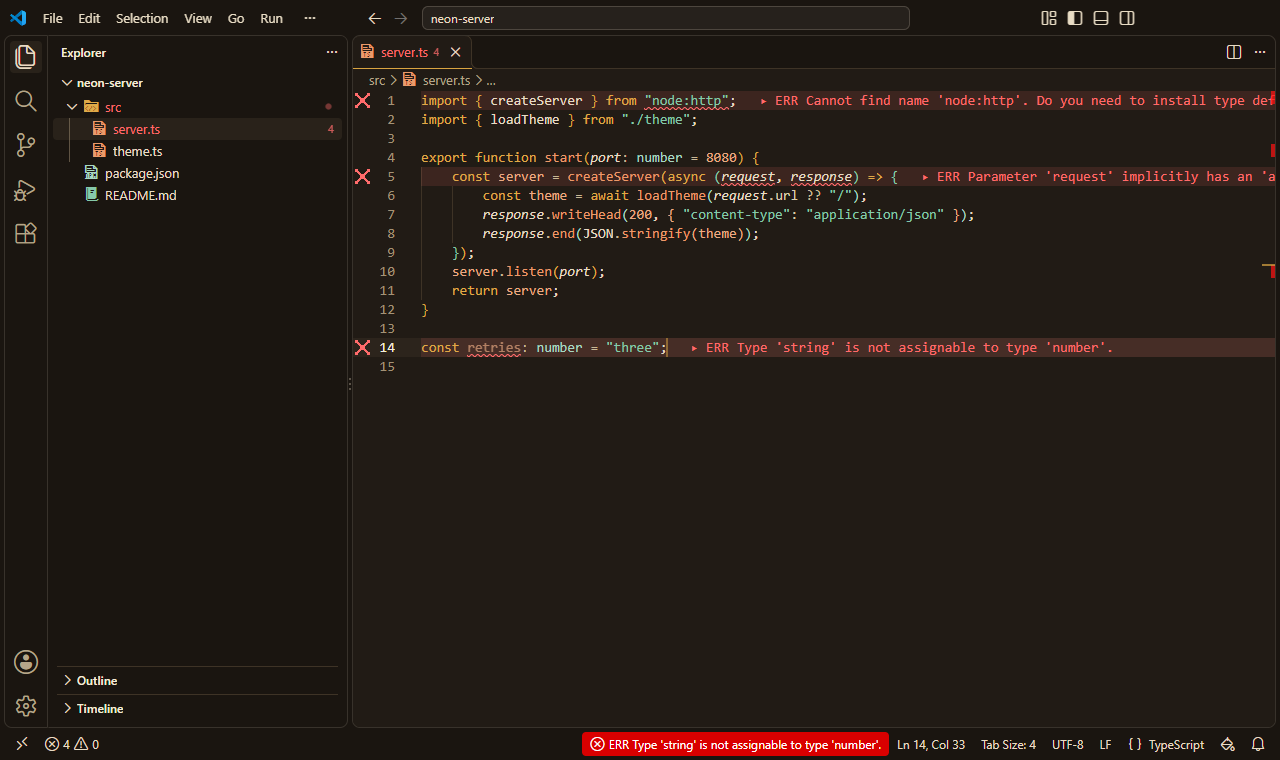
Brass
Brass and copper on dark bronze, with verdigris in the strings, and only the calm settings, for slow and careful thinking.
The story
Where it comes from. Ted Chiang's story collection Exhalation (2019) opens in a world of mechanical beings whose thoughts run on air: brass lungs, copper gears, and an anatomist who opens his own head to see how memory works.
The colors. Dark bronze-brown, like the inside of a polished machine. Brass keywords, copper functions and numbers, and the green of verdigris, the patina old metal gathers, for strings and types.
The settings. Only the calm settings: smooth cursor, current-line highlight and bracket guides. Slow, careful work, like the anatomist's.
- Color theme
- Stylesmith Brass
- File icons
- Stylesmith Pixel Brass
- Settings on
- Smooth cursor, Highlight current line, Bracket pair guides, Calm minimap
- Recommended font
- MonaspiceXe Nerd Font
-
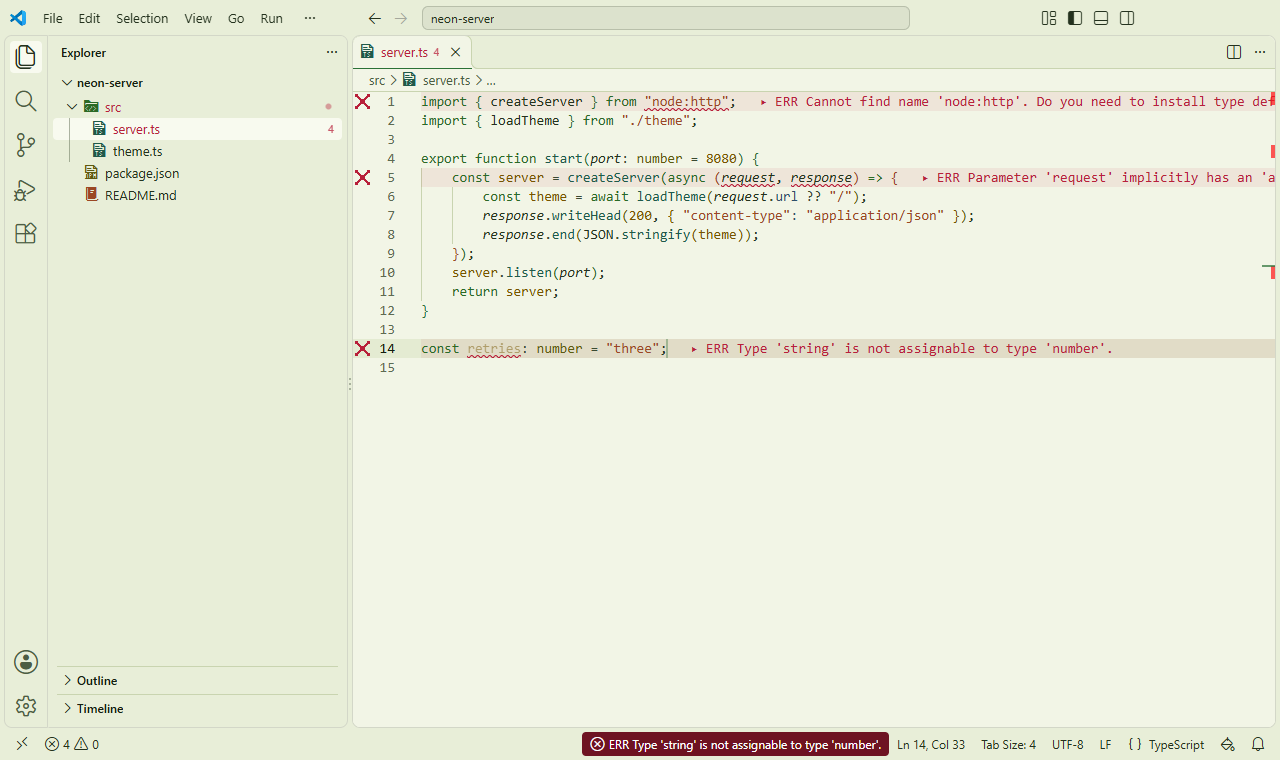
Tea Garden
A sunlit greenhouse: off-white with a hint of green, moss text, and leaf, mustard and terracotta accents, with a smooth cursor, the current line and a calm minimap.
The story
Where it comes from. Becky Chambers' A Psalm for the Wild-Built (2021) follows a tea monk through a gentle world where people learned to live within their means, long after the robots walked away into the wilderness.
The colors. A warm off-white with a hint of green, like light through a greenhouse. Text in dark moss, keywords in leaf green, strings in terracotta and numbers in a deep mustard.
The settings. A smooth cursor, the current-line highlight and a calm minimap: nothing mechanical, nothing that ticks.
- Color theme
- Stylesmith Tea Garden
- File icons
- Stylesmith Pixel Tea Garden
- Settings on
- Smooth cursor, Highlight current line, Calm minimap
- Recommended font
- RecMonoCasual Nerd Font
-
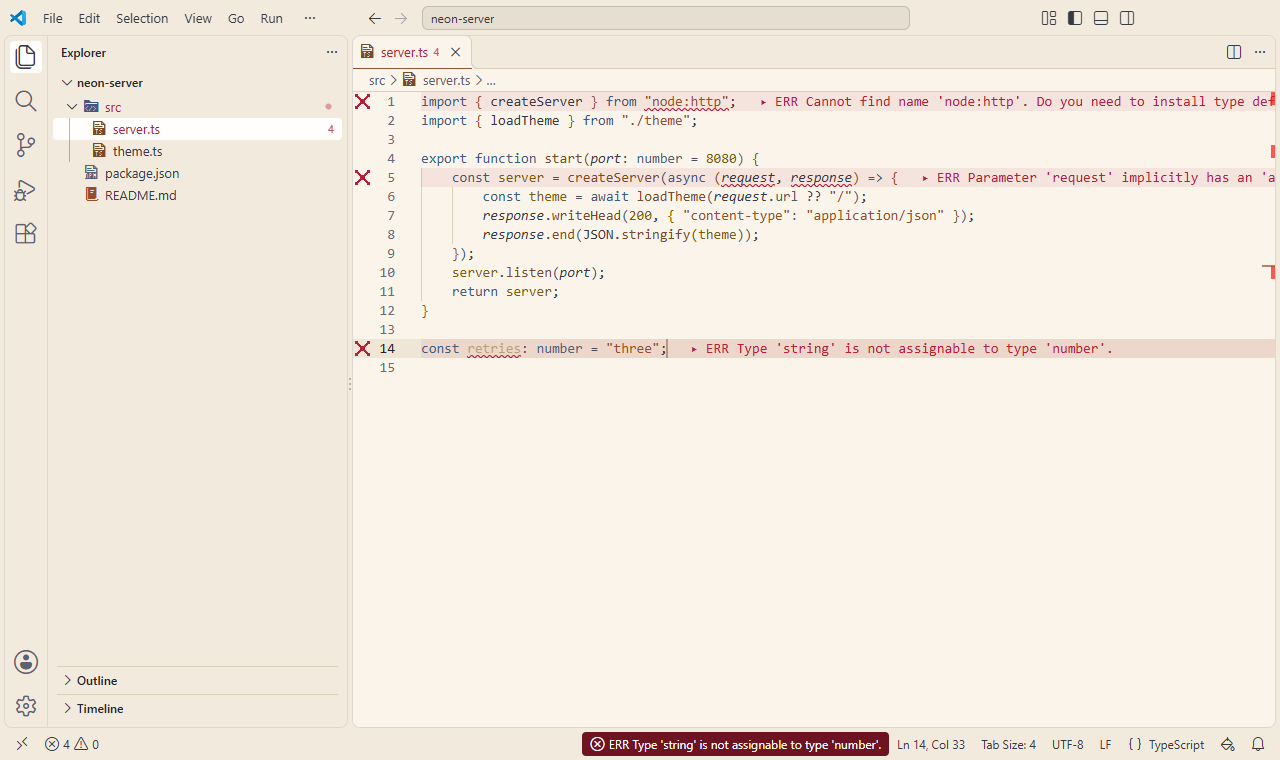
Sunroom
Soft sunlight on pale walls: warm cream, muted grey-blue structure and terracotta accents, with unfocused editors dimmed.
The story
Where it comes from. Kazuo Ishiguro's Klara and the Sun (2021) is told by an artificial friend who watches the world through a shop window, and trusts in the kindness of the Sun.
The colors. Pale warm cream, like a wall in afternoon light. Muted grey-blue for keywords and types, terracotta for strings, and the ochre of late sun for numbers. Warm, but never bright: dark enough to read on the cream.
The settings. A smooth cursor, the current-line highlight, and unfocused editors dimmed, so attention rests on one window at a time, as Klara's does.
- Color theme
- Stylesmith Sunroom
- File icons
- Stylesmith Pixel Sunroom
- Settings on
- Smooth cursor, Highlight current line, Dim unfocused editors, Calm minimap
- Recommended font
- RecMonoCasual Nerd Font
-
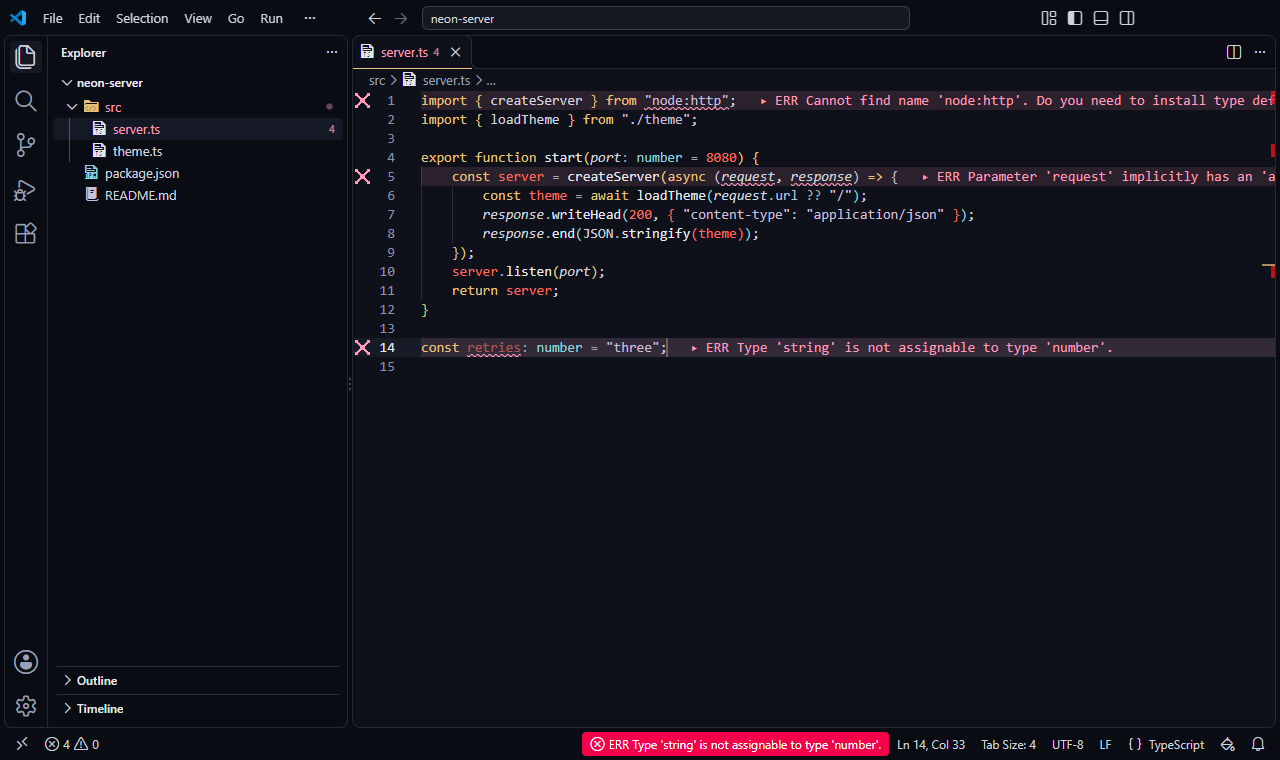
Countdown
A deep blue-black night sky with sun-gold keywords and every number in red, like a countdown, with unfocused editors dimmed.
The story
Where it comes from. Liu Cixin's The Three-Body Problem (2008; in English, 2014) begins with physics breaking down, and a countdown that only one scientist can see, ticking in his vision, under a sky that will blink for him, in a story of a world with three suns.
The colors. A deep blue-black night sky and pale starlight text, with sun-gold keywords, pale cyan types and faint lilac strings. One red is reserved for numbers: every number in the code is part of the countdown.
The settings. The calm settings, with unfocused editors dimmed: cold, quiet and focused.
- Color theme
- Stylesmith Countdown
- File icons
- Stylesmith Pixel Countdown
- Settings on
- Smooth cursor, Highlight current line, Bracket pair guides, Dim unfocused editors, Calm minimap
- Recommended font
- BlexMono Nerd Font
-
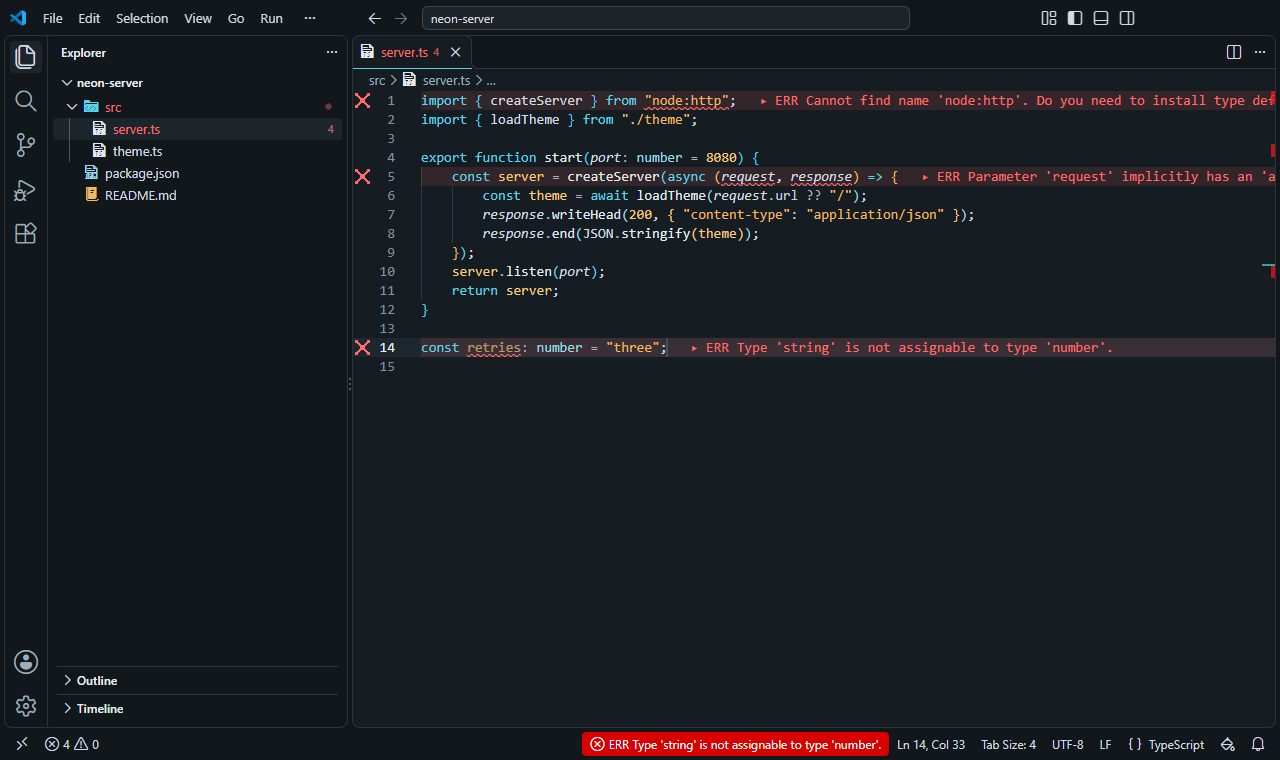
Overlay
A security unit's view of the world: cyan interface overlays and amber alerts on dark slate, with a block cursor in the terminal.
The story
Where it comes from. Martha Wells' The Murderbot Diaries (2017–) are told by a security unit that would rather watch its media than talk to humans, and that sees the world through camera feeds and system overlays.
The colors. Dark slate, like a display behind glass. Keywords in the cyan of an interface overlay, and strings and numbers in amber, like alerts that need attention but not panic.
The settings. Smooth cursor, current-line highlight and bracket guides, and a block cursor in the terminal, where the feeds come in.
- Color theme
- Stylesmith Overlay
- File icons
- Stylesmith Pixel Overlay
- Settings on
- Smooth cursor, Highlight current line, Bracket pair guides, Block terminal cursor, Sticky scroll
- Recommended font
- MartianMono Nerd Font
Everyday
Bright rooms and maximum contrast.
-
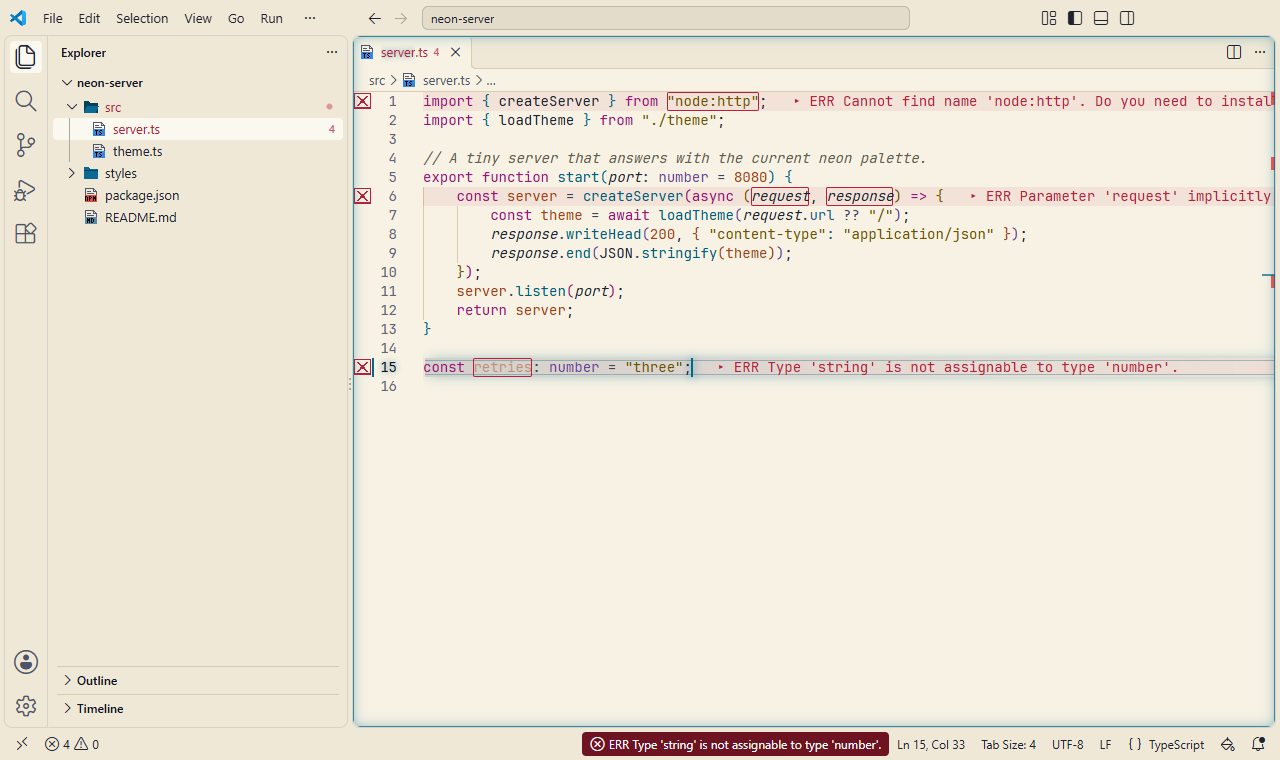
Daylight
Dark ink on a warm, paper-like background for well-lit rooms, with pixel file icons.
The story
Where it comes from. Not every session happens at night. Daylight starts from the printed page: dark ink on warm paper, the oldest readable display there is.
The colors. Dark ink on a warm, paper-like background, with deep magenta, blue and brown accents chosen to stay readable in a bright room.
The settings. A smooth cursor and a current-line highlight, and nothing else to distract.
- Color theme
- Stylesmith Daylight
- File icons
- Stylesmith Pixel Daylight
- Settings on
- Smooth cursor, Highlight current line
- Recommended font
- JetBrainsMono Nerd Font
-
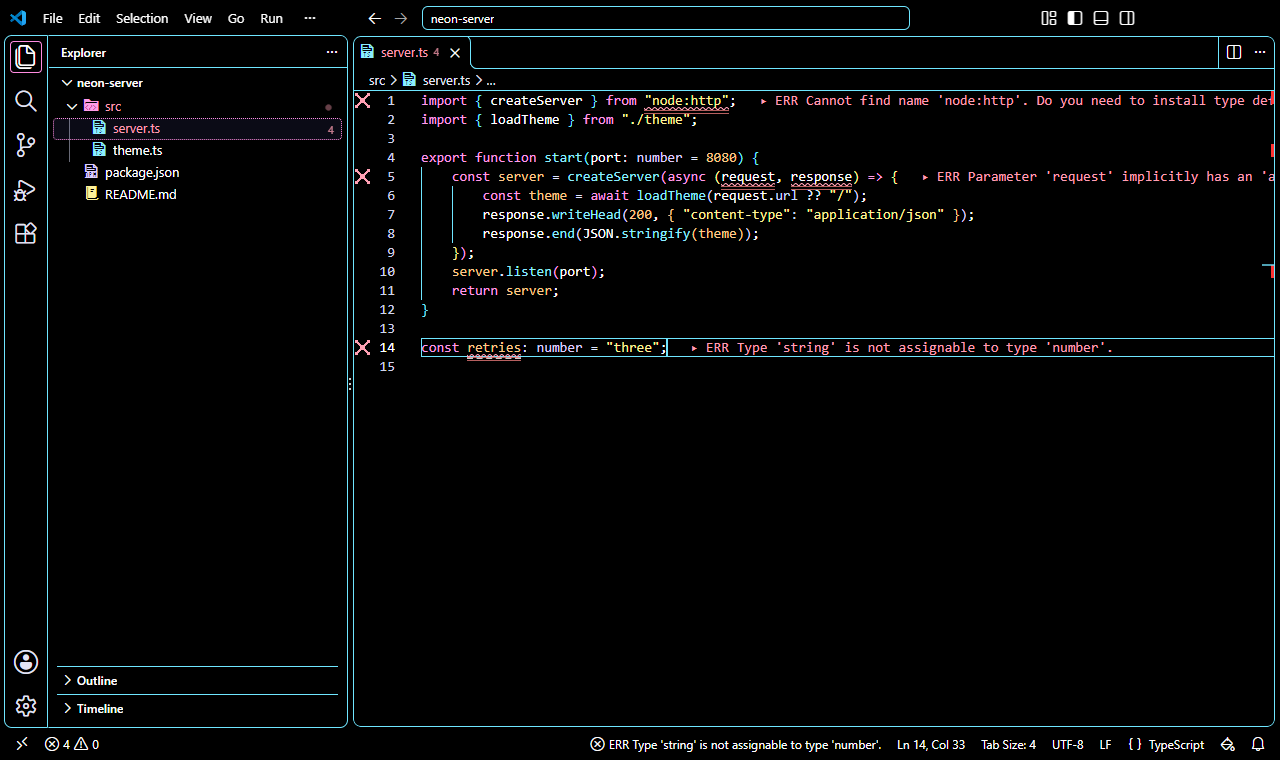
High Contrast
The high-contrast theme with borders around every area, no smooth cursor animation, clear bracket guides and readable terminal contrast.
The story
Where it comes from. Some days, and some eyes, need the most contrast a screen can give. This preset pairs well with AtkynsonMono, based on Atkinson Hyperlegible Mono, which the Braille Institute designed for readers with low vision.
The colors. White text on black with Neon Night's accents at full strength: every text color at least 7:1, and borders around every area.
The settings. No smooth cursor animation, a current-line highlight, clear bracket guides and readable terminal contrast.
- Color theme
- Stylesmith Neon High Contrast
- File icons
- Stylesmith Pixel Neon High Contrast
- Settings on
- Highlight current line, Bracket pair guides, Readable terminal
- Recommended font
- AtkynsonMono Nerd Font
-
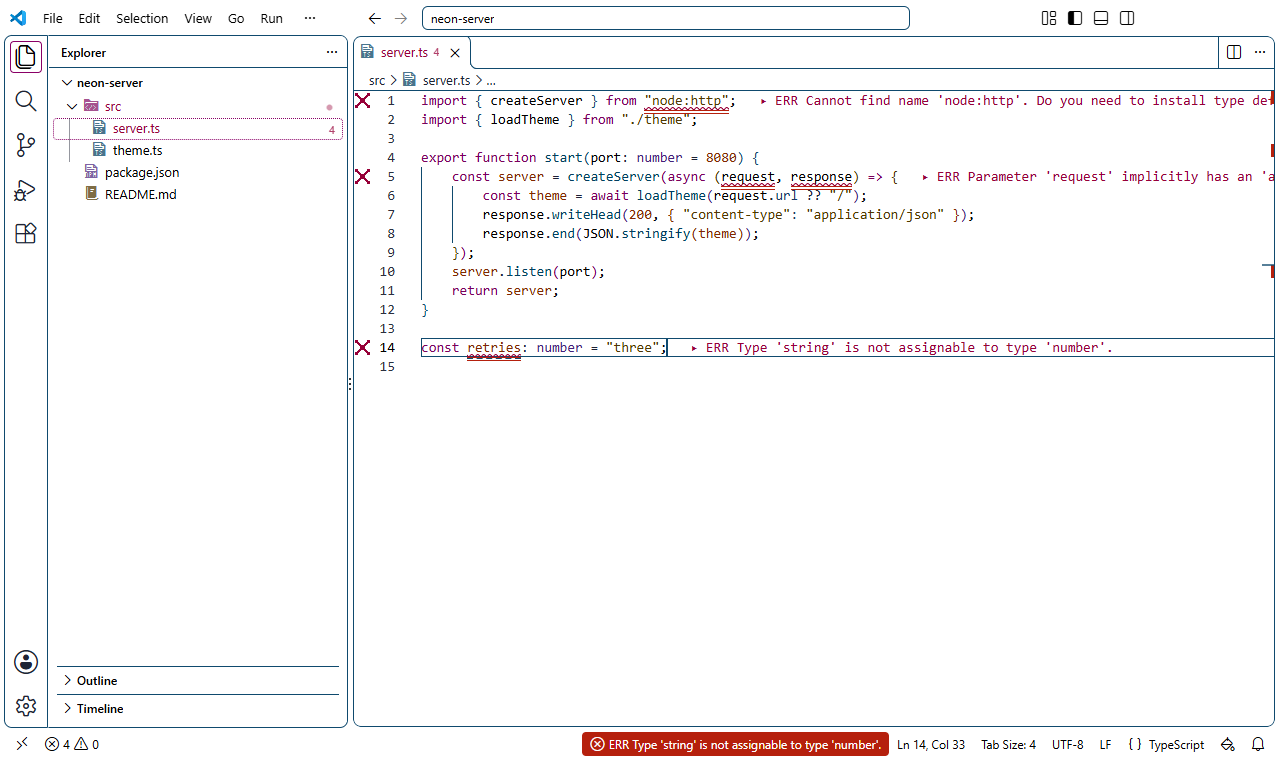
High Contrast Light
The light high-contrast theme, black text on white, with the same calm settings as High Contrast.
The story
Where it comes from. High contrast for a bright room: the same care as High Contrast, on white. It pairs well with AtkynsonMono, based on Atkinson Hyperlegible Mono, which the Braille Institute designed for readers with low vision.
The colors. Black text on white with dark, saturated accents: every text color at least 7:1, and borders around every area.
The settings. No smooth cursor animation, a current-line highlight, clear bracket guides and readable terminal contrast.
- Color theme
- Stylesmith Daylight High Contrast
- File icons
- Stylesmith Pixel Daylight High Contrast
- Settings on
- Highlight current line, Bracket pair guides, Readable terminal
- Recommended font
- AtkynsonMono Nerd Font
The stories name the books and machines that inspired these looks: Neuromancer and Burning Chrome by William Gibson; Story of Your Life and Exhalation by Ted Chiang; A Psalm for the Wild-Built by Becky Chambers; Klara and the Sun by Kazuo Ishiguro; The Three-Body Problem by Liu Cixin; The Murderbot Diaries by Martha Wells; the IBM 5151 display (IBM); the VT100 terminal and VR201 monitor (Digital Equipment Corporation). Names belong to their owners. Stylesmith is an independent project, not affiliated with or endorsed by any of them, and its themes are original work.
Color themes
Every theme works on its own: choose it in VS Code with Preferences: Color Theme, without a preset or any Stylesmith setting. The contrast shown is the measured ratio of the editor text to the editor background; the ergonomics page lists everything the theme tests check.
Retro terminals
-
// tally the night shift
function total(hours) {
  return hours * 1.5 + " h";
}
Stylesmith Phosphor
Dark
A late-1970s video terminal with green phosphor: one green range on near-black, with comments dimmed like a fading trace.
- Editor text contrast
- 14.8:1
- Used by preset
- Phosphor Terminal
-
// tally the night shift
function total(hours) {
  return hours * 1.5 + " h";
}
Stylesmith Amber
Dark
An early-1980s monochrome monitor with amber phosphor: warm amber and orange tones on a dark brown-black background.
- Editor text contrast
- 13.5:1
- Used by preset
- Amber Monitor
-
// tally the night shift
function total(hours) {
  return hours * 1.5 + " h";
}
Stylesmith ICE
Dark
A cold white-phosphor screen at night: blue-white text, accents and syntax on a blue-black background.
- Editor text contrast
- 15.2:1
- Used by preset
- Black ICE
Inspired by film
-
// tally the night shift
function total(hours) {
  return hours * 1.5 + " h";
}
Stylesmith Neon Night
Dark
Neon signs reflected on wet streets at night: hot pink and cyan accents and yellow strings on a deep indigo background.
- Editor text contrast
- 14.8:1
- Used by preset
- Night City
-
// tally the night shift
function total(hours) {
  return hours * 1.5 + " h";
}
Stylesmith Monolith
Dark
Blue-grey stone and a single soft blue accent: a calm, minimal dark theme, with syntax in quiet greys, sage and tan.
- Editor text contrast
- 12.2:1
- Used by preset
- Monolith
-
// tally the night shift
function total(hours) {
  return hours * 1.5 + " h";
}
Stylesmith Glass Lab
Dark
Warm concrete greys, soft off-white text and one coral accent. Errors lean magenta and deleted lines orange, so neither reads as the accent.
- Editor text contrast
- 11.5:1
- Used by preset
- Glass Lab
-
// tally the night shift
function total(hours) {
  return hours * 1.5 + " h";
}
Stylesmith Vault
Dark
A deep navy shelter with warm off-white text and a bright yellow accent: the upbeat look of a 1950s vision of the future.
- Editor text contrast
- 14.1:1
- Used by preset
- Vault
-
// tally the night shift
function total(hours) {
  return hours * 1.5 + " h";
}
Stylesmith Simulation
Dark
A charcoal city with a faint green cast: greyed text and syntax, keywords in glowing code green, a warm red for return, break and throw, and blue for constants.
- Editor text contrast
- 9.9:1
- Used by preset
- Simulation
-
// tally the night shift
function total(hours) {
  return hours * 1.5 + " h";
}
Stylesmith Steel and Rust
Dark
Cold blue-grey steel and dim light: steel-blue keywords, rust for numbers and control flow, and muted brass strings.
- Editor text contrast
- 11.2:1
- Used by preset
- Steel and Rust
-
// tally the night shift
function total(hours) {
  return hours * 1.5 + " h";
}
Stylesmith Deep Desert
Dark
Near-black brown with sand text, spice-orange keywords, ochre strings, and a deep blue for return, break and throw.
- Editor text contrast
- 12.7:1
- Used by preset
- Deep Desert
-
// tally the night shift
function total(hours) {
  return hours * 1.5 + " h";
}
Stylesmith Haze
Dark
Cold grey concrete with haze-orange keywords and teal strings; everything else muted.
- Editor text contrast
- 11.2:1
- Used by preset
- Haze
-
// tally the night shift
function total(hours) {
  return hours * 1.5 + " h";
}
Stylesmith Grid
Dark
Near-black with cyan keywords and pale cyan text, and orange for return, break and throw. Clean and geometric.
- Editor text contrast
- 14.2:1
- Used by preset
- Grid
-
// tally the night shift
function total(hours) {
  return hours * 1.5 + " h";
}
Stylesmith Corridor
Light
Light: pale institutional green with dark teal text, teal keywords, blue functions and rust numbers. No italics or bold.
- Editor text contrast
- 10.3:1
- Used by preset
- Corridor
-
// tally the night shift
function total(hours) {
  return hours * 1.5 + " h";
}
Stylesmith Teal Terminal
Dark
Dark: the office floor's boxy teal-green terminals, with mint keywords and pale yellow numbers. No italics or bold.
- Editor text contrast
- 12.8:1
- Used by preset
- Teal Terminal
-
// tally the night shift
function total(hours) {
  return hours * 1.5 + " h";
}
Stylesmith Horizon
Dark
Black with warm orange keywords, peach functions, lilac strings and blue types.
- Editor text contrast
- 15.3:1
- Used by preset
- Horizon
-
// tally the night shift
function total(hours) {
  return hours * 1.5 + " h";
}
Stylesmith Command Deck
Dark
Grey-black metal with cold grey text, muted blue keywords, and one red alarm: return, break and throw.
- Editor text contrast
- 11.5:1
- Used by preset
- Command Deck
Inspired by books
-
// tally the night shift
function total(hours) {
  return hours * 1.5 + " h";
}
Stylesmith Brass
Dark
Dark bronze-brown with warm cream text: brass keywords, copper functions and numbers, and verdigris strings and types.
- Editor text contrast
- 12.6:1
- Used by preset
- Brass
-
// tally the night shift
function total(hours) {
  return hours * 1.5 + " h";
}
Stylesmith Tea Garden
Light
Light: warm off-white with a hint of green, dark moss text, leaf-green keywords, terracotta strings and mustard numbers.
- Editor text contrast
- 12.2:1
- Used by preset
- Tea Garden
-
// tally the night shift
function total(hours) {
  return hours * 1.5 + " h";
}
Stylesmith Sunroom
Light
Light: pale warm cream, grey-blue keywords and types, terracotta strings and ochre numbers, warm and muted.
- Editor text contrast
- 10.4:1
- Used by preset
- Sunroom
-
// tally the night shift
function total(hours) {
  return hours * 1.5 + " h";
}
Stylesmith Countdown
Dark
Deep blue-black night sky, pale starlight text, sun-gold keywords, pale cyan types, and one red: every number.
- Editor text contrast
- 12.6:1
- Used by preset
- Countdown
-
// tally the night shift
function total(hours) {
  return hours * 1.5 + " h";
}
Stylesmith Overlay
Dark
Dark slate with cyan keywords like interface overlays, and amber strings and numbers like alerts. Utilitarian, not neon.
- Editor text contrast
- 12.2:1
- Used by preset
- Overlay
Everyday
-
// tally the night shift
function total(hours) {
  return hours * 1.5 + " h";
}
Stylesmith Daylight
Light
Dark ink on a warm, paper-like background, with deep magenta, blue and brown accents. Made for well-lit rooms.
- Editor text contrast
- 14.2:1
- Used by preset
- Daylight
-
// tally the night shift
function total(hours) {
  return hours * 1.5 + " h";
}
Stylesmith Neon High Contrast
High contrast, dark
Neon Night's accents at full strength: white text on black, every text color at least 7:1, and borders around every area.
- Editor text contrast
- 21.0:1
- Used by preset
- High Contrast
-
// tally the night shift
function total(hours) {
  return hours * 1.5 + " h";
}
Stylesmith Daylight High Contrast
High contrast, light
Black text on white with dark, saturated accents, every text color at least 7:1, and borders around every area.
- Editor text contrast
- 21.0:1
- Used by preset
- High Contrast Light
Ready to style your editor?
Explore Stylesmith's built-in themes and review its security notes.
View Installation Guide